


Video intercom
Unlock for the courier
He rings, you see him, you talk. Unlock from your phone if you choose.

Blusafe Venix · Smart deadbolt
Palm vein and 3D face recognition, a 720p video doorbell, PINs for everyone, the Tuya Smart app and a mechanical key. One lock. Six ways in.
Smart deadbolt only. Separate handle required and not included.
*Figures indicate expected battery life under normal operating conditions. Actual battery life depends on unlocking frequency and the number of video calls.
Meet Venix
Six ways in and a 720p video doorbell, in one slim panel.

*Remote unlock needs Venix set up in the Tuya Smart app on 2.4 GHz Wi-Fi, and your phone online. Smart deadbolt only. Separate handle required and not included. Illustrative animation.
One lock. Your choice.
Everyone in your home comes in their own way. Pick a method to see it work.


Just look. Enrol your face from 30–120 cm (12–47 in) away; about 50 cm (20 in) is best.
Raise your palm. Venix reads the vein pattern under the skin. Enrol 10–30 cm (4–12 in) away; 15–25 cm (6–10 in) is best.
Everyone gets their own 6–10 digit PIN, with up to 50 PINs in total.
Set a temporary PIN in the Tuya Smart app for guests, cleaners and dog walkers. Change guests, not locks.
Unlock from your phone, at the office, at the airport or on the beach.*
The key is always there as a backup.
Someone rings the bell and your phone gets a 720p live video call. Talk to them through the door with two-way audio.*
If the battery ever dies, power Venix from USB-C on the bottom edge, then unlock as normal.
Face and palm distances are enrolment guidance from the manufacturer, not unlocking range. Illustrative scan graphics, not actual sensor output. *Remote features need Venix set up in the Tuya Smart app on 2.4 GHz Wi-Fi, and your phone online. The intercom sends 720p live video to your phone with two-way audio; Venix has no screen. USB-C powers the lock if the battery runs out; it is not a way to unlock by itself. Illustrative scenes, diagram and app screens.

3D face recognition
Walk up. Look. Unlocked.
Venix retracts the deadbolt when it recognizes you. You open the door with your handle.
Face distances are the manufacturer's enrolment guidance, not unlocking range. Illustrative scan graphic. Separate handle required and not included.
Face and palm vein
Two biometric ways in. 3D face recognition and palm vein read through the same sensor windows and share 50 biometric profiles. Palm vein reads the pattern of veins under your skin, so you raise a hand rather than touch anything.
Designed to resist photos, videos and masks.
The vein pattern it reads is beneath your skin.


Drag to see what Venix sees
Measured from the front of the lock: palm close in, face a little further out. It is guidance for adding a face or palm, not an unlocking range.
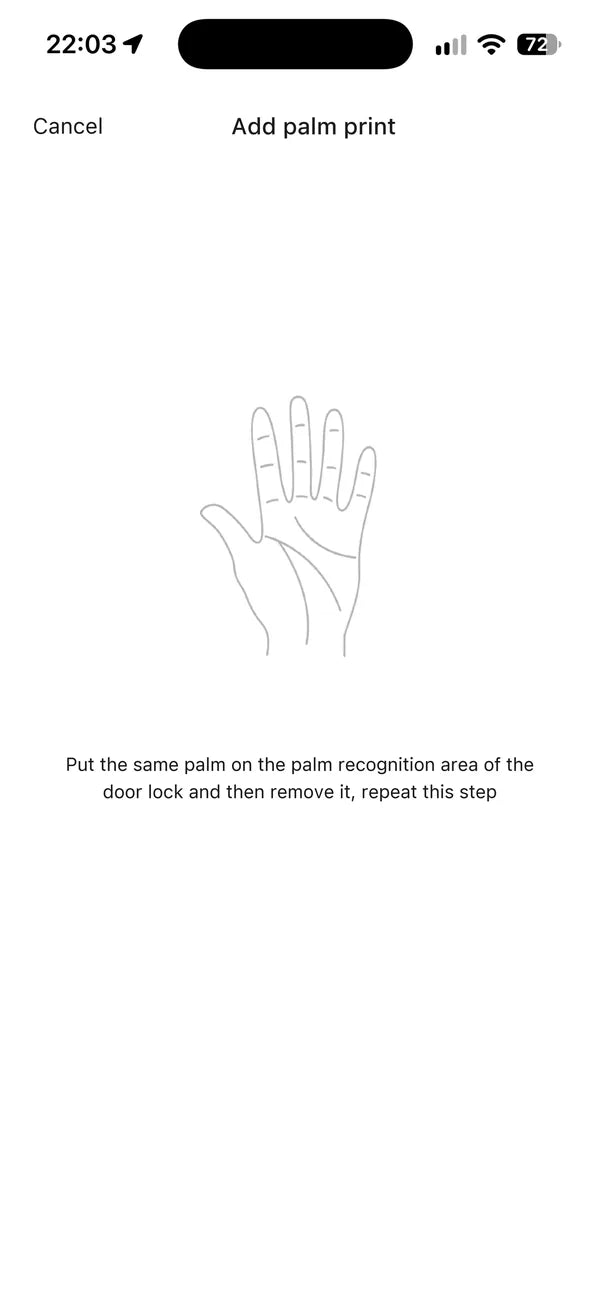
In the Tuya Smart app. The scan happens at the lock first; then the app shows the registered ID number.
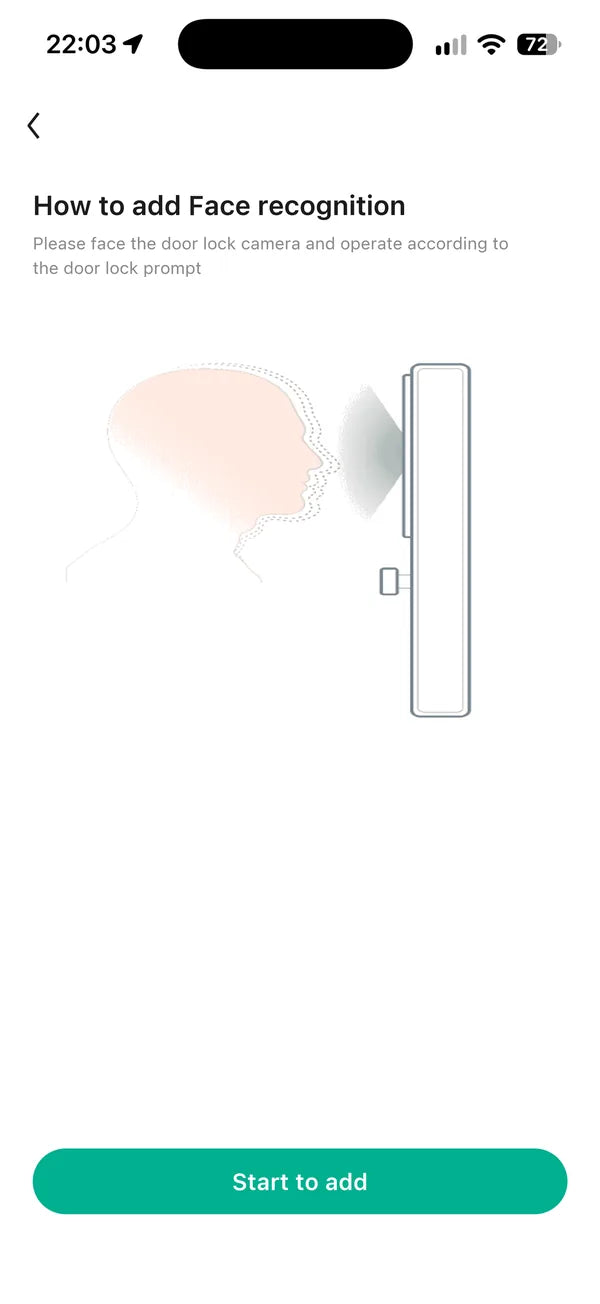

Choose to add a face, then tap Start to add.
Choose to add a palm, then tap Start to add.

Look at the lock, about 50 cm (20 in) away, until the scan completes.
Hold up your palm 15–25 cm (6–10 in) from the lock, as many times as the app asks.


The app confirms it and shows the registered ID number.
The app confirms it and shows the registered ID number.
Illustrative graphics, not actual sensor output. Distances are the manufacturer's enrolment guidance from the front of the lock, not unlocking range. App screens are real Tuya Smart screens; a row not relevant here is blurred.
Someone at the door?
Answer from wherever you are.
*Remote unlock needs Venix set up in the Tuya Smart app on 2.4 GHz Wi-Fi, and your phone online. Venix retracts the bolt; the door opens by hand with your separate handle (not included). Illustrative photo; real Tuya Smart app screens with an illustrative caller.
720p video doorbell
Someone rings, and your phone gets a 720p live video call. Answer it and talk through Venix.
A 720p view, 72.8° top to bottom and 45° side to side. What's in view depends on mounting height and distance.
Someone presses the bell key, and your phone gets a live video call over your home Wi-Fi.
When someone presses the bell, your phone rings with 720p live video from the door. Answer in the Tuya Smart app, talk through Venix and unlock from your phone if you choose.
Your visitor hears you. Venix has no screen, so they don't see you.
Remote features need Venix set up in the Tuya Smart app on 2.4 GHz Wi-Fi, and your phone online. Illustrative photos and diagrams, not to scale; what's in view depends on mounting height and distance. Real Tuya Smart app screens with an illustrative caller.
Real life, real doors
Couriers, kids, guests and full arms. Swipe through a week with Venix.
Video intercom
He rings, you see him, you talk. Unlock from your phone if you choose.

3D face recognition
Unlock with a look while your arms are full.

For the whole family
No key to lose. Her face, or her own PIN.

Video intercom
See who's at the door and talk to them from the couch.

Temporary PIN
Their own temporary PIN. No spare key to hide.

For the holidays
Family visiting? Give them their own temporary PIN.

Move-in day
Your codes, not old keys.

Garage and side doors
Install Venix on a compatible garage entry or side door too.

Spare key
No more key under the mat.

Holiday gifting
Six ways in for the whole household.
Illustrative scenes and graphics. App screens are the Tuya Smart app with staged video feeds. Remote features need Venix set up in the Tuya Smart app on 2.4 GHz Wi-Fi, and your phone online. Separate handle required and not included.
Everyone comes and goes their own way.

 8:20 AM
Back from the school run
PIN


 6:00 PM
The evening dog walk
Temporary PIN

 11:40 PM
Home from the late shift
Palm vein
Illustrative scenes, people and times. Separate handle required and not included.
Household
Add up to 20 household members in the Tuya Smart app, with 50 face and palm profiles shared between them and 50 PINs.


Add each person as a member in the Tuya Smart app, then give them their own way in.
 Parent
PIN
 Parent
Palm vein
 Teen
3D face
 Grandparent
3D face
 Dog walker
Temporary PIN
Biometric profiles are shared between face and palm vein; permanent and temporary PINs share the 50 places. Illustrative household and studio renders; app screens from the Tuya Smart app.

Your front door, in your pocket.
Tuya Smart app
No trip back downstairs. Lock or unlock your front door in the Tuya Smart app: from bed, from work or from vacation.
Remote features need Venix set up in the Tuya Smart app on 2.4 GHz Wi-Fi, and your phone online. Illustrative scenes and timing, with real Tuya Smart app screens (a log line not relevant here is softened). Venix controls the deadbolt; you open the door with the separate handle, not included.

Set it once.
Venix throws the bolt again behind you.
Auto-relock
Turn on automatic relocking in the Tuya Smart app and Venix throws the bolt again 5 to 99 seconds after unlocking. Or leave it off.

Switch on “automatic lock switch”, then pick the delay in “auto lock delay time set”. This real screen is set to 10 seconds, the example the dial counts down.
Optional. Auto-relock runs on a timer after unlocking; it doesn't detect whether the door is closed. Illustrative render, loupe and countdown (sped up), with a real Tuya Smart app screen. Venix controls the deadbolt; you open the door with the separate handle, not included.

Dead battery? Still a way in.
USB-C emergency power on the bottom edge, and the mechanical key.
Power
A 7,800 mAh rechargeable lithium battery pack sits behind the interior cover. If it ever runs out, power Venix from the USB-C port on the bottom edge of the outside panel, then unlock with a supported method. The mechanical key is always there too.
*Figures indicate expected battery life under normal operating conditions. Actual battery life depends on unlocking frequency and the number of video calls. USB-C emergency power is not an unlocking method by itself. Illustrative cutaway, close-ups and USB-C cable.

Snow, sun or storm.
Built for extremes
An IP65-rated exterior, as stated by the manufacturer, with an operating range of −20°C to 60°C.
Stated ratings: IP65 weather resistance and a −20°C to 60°C operating range. Illustrative seasonal scenes, raindrops and studio render.

Looks right on every door.
Design
One black Venix for sage, navy, white or warm oak doors, from sunrise to porch light.
Any front door
One lock, any color door.
Door color
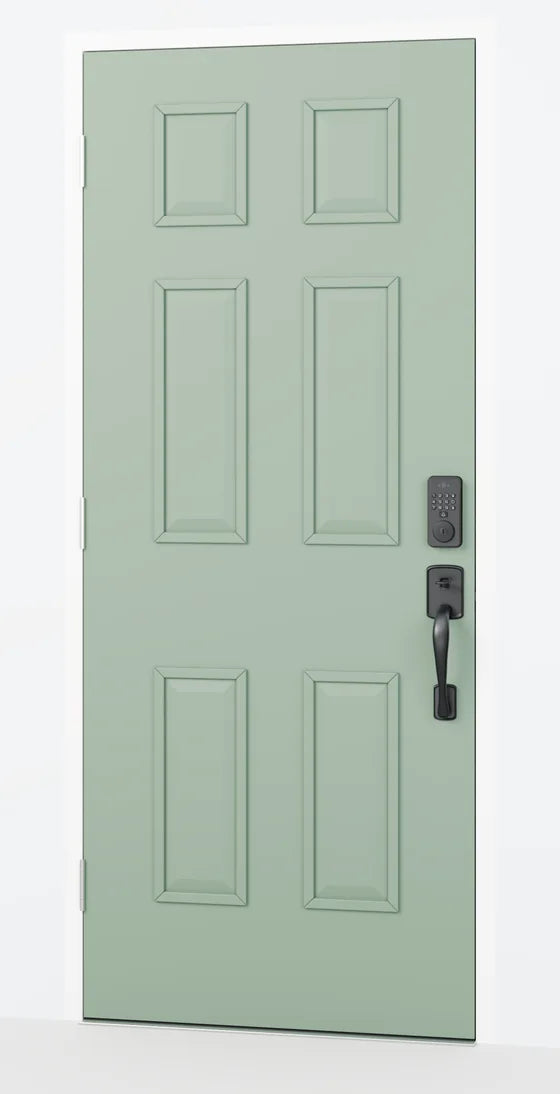
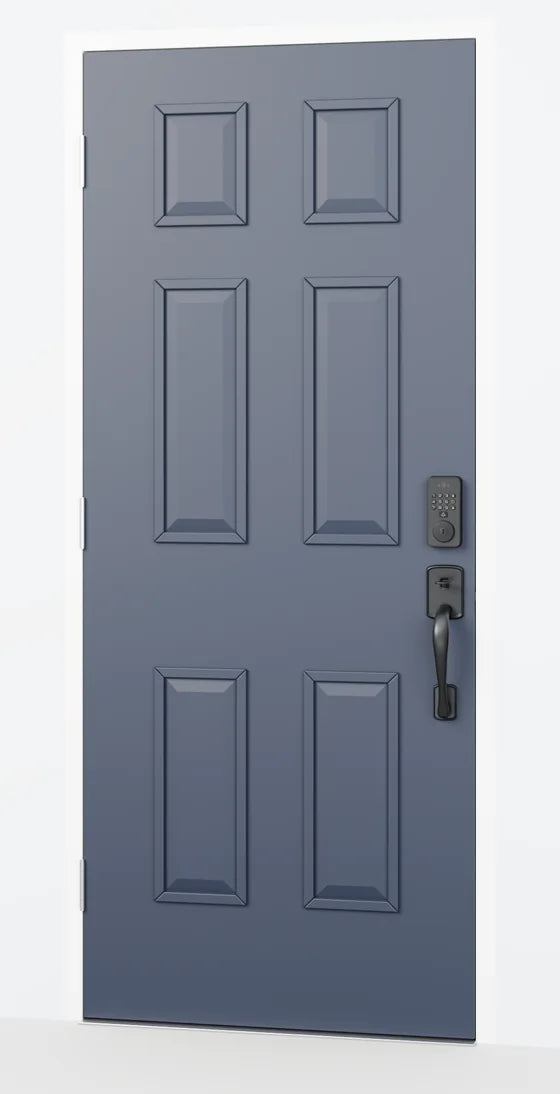

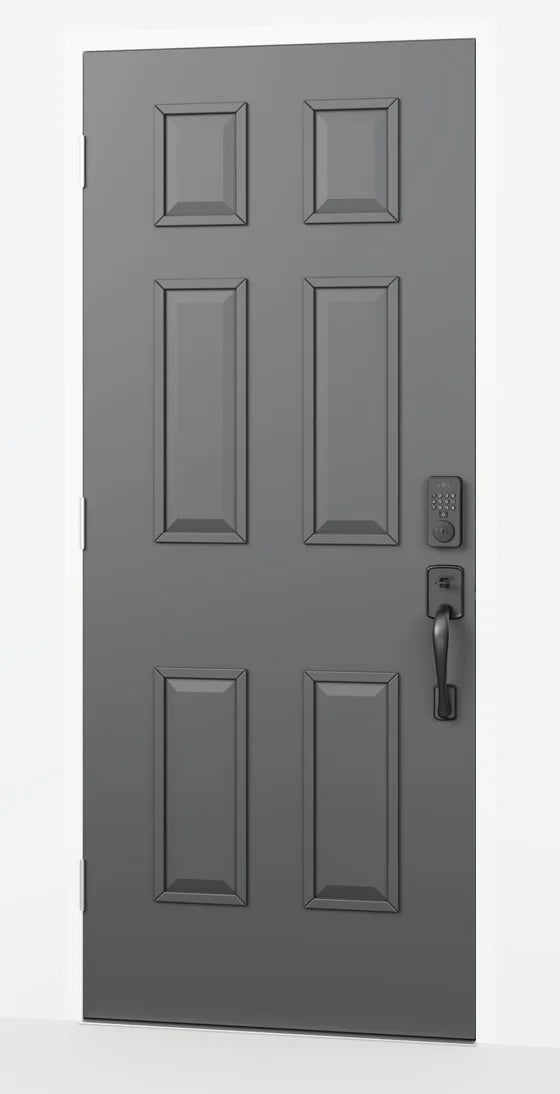

Illustrative studio render; door colors are examples.
Every door
One black Venix suits them all.
 Sagesix-panel
 Navysix-panel
 Whitesix-panel
 Warm oakslab
Illustrative door styles: one scene and camera, with only the door finish changed.
Before and after
Swap a keyed deadbolt for Venix, and keep a key as backup.


On a door already prepared for a standard deadbolt. Illustrative generic keyed deadbolt (no brand).
 VenixSensor windows
 VenixKeypad
 VenixKey cylinder
Details
Face, palm, keypad and key on the outside. Battery and thumbturn inside.


 Outside
Inside
*Figures indicate expected battery life under normal operating conditions. Actual battery life depends on unlocking frequency and the number of video calls. Dashed outline: the battery behind its cover. Illustrative studio renders at one scale.
Exterior panel
The exterior panel body is just 0.87 in (22.0 mm) deep.

 5.76 in146.4 mm
2.81 in71.4 mm
0.87 in22.0 mm
Front
Side
Exterior panel body dimensions from the manufacturer's panel drawing; projecting parts are not included.
The same Venix on the same door, from sunrise to porch light.
6ways inFace, palm, PIN, temporary PIN, app and key
5–99sOptional auto-relock after unlocking
 Dawn
 Noon
 Dusk
 Night
Illustrative times of day: one scene rendered four times from the same camera.
Exterior panel body 5.76 × 2.81 × 0.87 in (146.4 × 71.4 × 22.0 mm).
 Front
 Three-quarter left
 Three-quarter right
 Side
 Inside
Studio renders at one scale. Exterior panel body size from the manufacturer's panel drawing; projecting parts are not included.
Illustrative renders; door colors are examples. Separate handle required and not included.
Built in layers
Watch Venix come apart, then pick any part. The numbers follow the fitting order.

Fits the edge of the door
Face, palm, keypad, camera and key
Fits on the inside of the door
Thumbturn and battery bay
7,800 mAh rechargeable pack
Fits over the battery last
Illustrative exploded view; spacing exaggerated; the front–rear cable is not shown. Separate handle required and not included.
Interactive manual
Step-by-step installation, app pairing and troubleshooting, with original illustrations. On a door already prepared for a standard deadbolt, Venix installs in six steps. To pair, press 3, then Unlock.


Install the deadbolt Set it to your backset, slide it into the door edge and screw on the faceplate.
Install the outside panel Its cable goes through the door to the inside.
Install the mounting plate On the inside of the door, with the cable passed through it.
Install the inside panel Plug in both cable connectors first, then screw the inside panel on.
Battery in, cover on The lithium battery pack slides into its bay, then the cover goes on.
Close and lock Close the door and check that the bolt throws into the strike.
Pair it in the Tuya Smart app Press 3, then Unlock: one after the other, never at the same time. Venix joins 2.4 GHz Wi-Fi.
Simplified from the installation guide, which also covers the strike plate, the tail-bar length and plugging in the two cable connectors. New doors need drilling. Illustrative installation animation and keypad close-up. Separate handle required and not included.
Before you buy

On a door already prepared for a standard deadbolt, Venix installs in six steps. New doors need drilling, and the cutout drawing is in the box. Not sure? Send us photos of your door and we'll help.
Smart deadbolt only. Separate handle required and not included. Sizes from the installation guide; hole sizes are nominal. Illustrative animation and diagrams; the door section shows a 1¾ in (44 mm) door, latch not shown.

Every detail, considered.
Specifications
 5.76 in 146.4 mm
2.81 in 71.4 mm
 6.94 in 176.4 mm
2.93 in 74.4 mm
Panel sizes are the outside and inside panel bodies from the manufacturer’s drawing; projecting controls and fittings are not included. Enrolment distances describe setup, not unlocking range. Inch conversions are approximate. Illustrative studio renders. *Figures indicate expected battery life under normal operating conditions. Actual battery life depends on unlocking frequency and the number of video calls.
The smart lock, its battery pack and the accessory kit, laid out.
 Cutout drawing
 Venix smart lock
 Lithium battery pack
 Lock body accessory kit
 38 mm spare door-hole locator
 Keys
Illustrative layout. Separate handle required and not included.
Questions
Five things worth knowing before you install one.

Illustrative studio render. Separate handle required and not included.
The USB-C port on the bottom edge supplies emergency power: connect power, then unlock with a supported method, or use the mechanical key. Emergency power is not a way to unlock by itself.
No. Your visitor hears you through Venix; Venix has no screen. You see them on a 720p live video call in the Tuya Smart app, with two-way audio.
Venix fits doors 35–55 mm thick with a 60 or 70 mm backset. Existing compatible preparation can be reused; fresh installations need drilling. A separate passage or latch handle is required and not included.
Only if you want it to. You can turn automatic relocking on or off and set a delay of 5–99 seconds after unlocking. It runs on a timer and doesn't detect whether the door is closed. Venix retracts the deadbolt when you authenticate; you open the door with the separate handle, which is not included.
Yes. Venix uses the Tuya Smart app, and you can unlock it remotely from there. Remote unlocking and the live video call need Venix set up in the app on 2.4 GHz Wi-Fi, and your phone online.
Venix stores 50 biometric profiles in total, shared between face and palm vein.
Yes. Set up a temporary PIN for them in the Tuya Smart app. Permanent and temporary PINs share 50 places, and each PIN is 6–10 digits long.
Cloud recording isn't included. Check the Tuya Smart app for current UK cloud storage options and any charges.
Venix does not support Apple HomeKit, Matter, fingerprint, RFID or NFC unlocking. Alexa and Google Assistant operation in the UK has not been verified; contact us if voice control is essential.

Blusafe Venix
Venix. Come home your way.
Smart deadbolt only. Separate handle required and not included. Remote features need Venix set up in the Tuya Smart app on 2.4 GHz Wi-Fi, and your phone online. Illustrative render.


